

In this tutorial, you'll learn about strings in C programming. You'll learn to declare them, initialize them and use them for various I/O operations with the help of examples.
In C programming, a string is a sequence of characters terminated with a null character \0. For example:
char c[] = "c string";
When the compiler encounters a sequence of characters enclosed in the double quotation marks, it appends a null character \0 at the end by default.

How to declare a string?
Here's how you can declare strings:
char s[5];
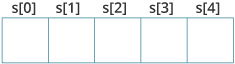
Here, we have declared a string of 5 characters.
How to initialize strings?
You can initialize strings in a number of ways.
char c[] = "abcd";

char c[50] = "abcd";

char c[] = {'a', 'b', 'c', 'd', '\0'};

char c[5] = {'a', 'b', 'c', 'd', '\0'};
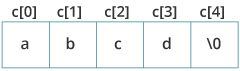
Let's take another example:
char c[5] = "abcde";Here, we are trying to assign 6 characters (the last character is '\0') to a char array having 5 characters. This is bad and you should never do this.
Assigning Values to Strings
Arrays and strings are second-class citizens in C; they do not support the assignment operator once it is declared. For example,
char c[100];
c = "C programming";  // Error! array type is not assignable.
Note: Use the strcpy() function to copy the string instead.
Read String from the user
You can use the scanf() function to read a string.
The scanf() function reads the sequence of characters until it encounters whitespace (space, newline, tab, etc.).
Example 1: scanf() to read a string
#include <stdio.h>
int main()
{
    char name[20];
    printf("Enter name: ");
    scanf("%s", name);
    printf("Your name is %s.", name);
    return 0;
}
Output
Enter name: Dennis Ritchie
Your name is Dennis.
Even though Dennis Ritchie was entered in the above program, only "Ritchie" was stored in the name string. It's because there was a space after Dennis.
How to read a line of text?
You can use the fgets() function to read a line of string. And, you can use puts() to display the string.
Example 2: fgets() and puts()
#include <stdio.h>
int main()
{
    char name[30];
    printf("Enter name: ");
    fgets(name, sizeof(name), stdin);  // read string
    printf("Name: ");
    puts(name);    // display string
    return 0;
}
Output
Enter name: Tom Hanks
Name: Tom Hanks
Here, we have used fgets() function to read a string from the user.
fgets(name, sizeof(name), stdlin); // read string
The sizeof(name) results to 30. Hence, we can take a maximum of 30 characters as input which is the size of the name string.
To print the string, we have used puts(name);.
Note: The gets() function can also be to take input from the user. However, it is removed from the C standard.
It's because gets() allows you to input any length of characters. Hence, there might be a buffer overflow.
Passing Strings to Functions
Strings can be passed to a function in a similar way as arrays. Learn more about passing arrays to a function.
Example 3: Passing string to a Function
#include <stdio.h>
void displayString(char str[]);

int main()
{
    char str[50];
    printf("Enter string: ");
    fgets(str, sizeof(str), stdin);
    displayString(str);     // Passing string to a function.
    return 0;
}
void displayString(char str[])
{
    printf("String Output: ");
    puts(str);
}
Strings and Pointers
Similar like arrays, string names are "decayed" to pointers. Hence, you can use pointers to manipulate elements of the string. We recommended you to check C Arrays and Pointers before you check this example.
Example 4: Strings and Pointers
#include <stdio.h>

int main(void) {
  char name[] = "Harry Potter";

  printf("%c", *name);     // Output: H
  printf("%c", *(name+1));   // Output: a
  printf("%c", *(name+7));   // Output: o

  char *namePtr;

  namePtr = name;
  printf("%c", *namePtr);     // Output: H
  printf("%c", *(namePtr+1));   // Output: a
  printf("%c", *(namePtr+7));   // Output: o
}


No comments:
Post a Comment